
The Schedule report is a great resource for analyzing past, present, and future scheduled services for your business.
In this article
Who can use this feature?
- Pike13 Plans: ✅Premium, ✅Advanced, ✅Essential
- User Roles: ✅Primary Owner, ✅Owner, ❌Manager, ❌Staff, ❌Limited Staff
Quick Views
Get immediate insights with these pre-set filters:
- Scheduled Services This Week: View all services scheduled from the current Monday through Sunday.
- Unconfirmed Attendance Last Week: Identify services from the previous week (Monday–Sunday) that are missing attendance records.
Summary View
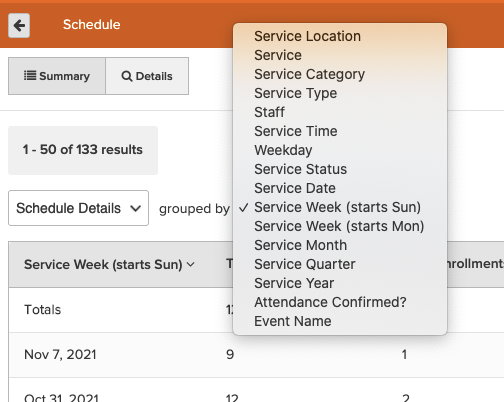
The Schedule Details summary allows you to group data by service attributes to see high-level trends.
The following metrics are computed for each group of services:
- Total Scheduled Events - count of all scheduled events
- Total Enrollments - count of all enrollments
- Total Capacity - sum of all scheduled service capacities
- Total Hours - sum of all scheduled service lengths in hours
- Attendance Confirmed? - count of scheduled services that had attendance taken by a staff member
- Paid - count of visits that have been paid
- Enrolled - count of client enrollments in a service that have not been completed
- Completed - count of client enrollments with confirmed attendance
- Completed & Unpaid - count of client enrollments with attendance confirmed but are still unpaid
- No Show - count of client enrollments marked as a no show
- Late Canceled - count of client enrollments that canceled after the cancellation deadline
- Currently on Waitlist - count of client enrollments on the waitlist for a service
- Canceled Waitlist - count of client enrollments removed from the waitlist
- Waitlist Expired - count of client enrollments that did not make it off a waitlist into a service
Key Dates
To refine your search, focus on the Service Date—the actual day the service took place. Use this date filter to pinpoint a specific timeframe for review, or group your data by Week, Month, or Quarter in the Summary View to analyze broader performance trends.

Details View
In addition to the summary view, there is also a Details view that shows greater details for each scheduled event occurrence for your business. This view can easily be filtered to a desired timeframe, set of services, staff members or more.
Available details in this view are:
- Service - Name of the service.
- Service Type - Type of the service. For example, Appointment, Group Class, or Course
- Service Category - Category of the service.
- Total Enrollments - Count of enrollments for the scheduled service.
- Capacity - The maximum number of clients that can register for the scheduled service.
- Staff - List of staff members for the scheduled service.
- Service Date - Date the service was provided.
- Day - Day of the week when the service is scheduled. For example, Monday.
- Service Time - Time of day when the service is scheduled. For example, 9:00 AM.
- Hours - Duration in hours of the scheduled service.
- Service Location - Location of the scheduled service.
- Visit Count - Count of visits for the scheduled service. This is the sum of Enrolled, Completed, No Show, and Late Canceled.
- Attendance Confirmed? - Indicates whether attendance was completed for the scheduled service.
- Paid - Count of paid enrollments for the scheduled service.
- Enrolled - Count of registered but not completed enrollments for the scheduled service.
- Completed - Count of completed enrollments for the scheduled service.
- Completed & Unpaid - Count of completed enrollments that were unpaid for the scheduled service.
- No Show - Count of enrollments that resulted in a no show for the scheduled service.
- Late Canceled - Count of late-canceled enrollments for the scheduled service.
- Waitlist Expired - Count of waitlist enrollments that never made it to the roster of the scheduled service.
- Canceled Waitlist - Count of waitlist enrollments that were canceled.
- Currently on Waitlist - Count of enrollments currently on the waitlist.
- Enrolled from Waitlist - Count of enrollments in the scheduled service that came from the waitlist.
- Started on Waitlist - Count of all waitlist enrollments for the scheduled service. This is the sum of Waitlist Expired, Canceled Waitlist, Currently on Waitlist, and Enrolled from Waitlist.
- Service Status - Current state of the service. Either Active or Deleted.
- Event Name - Name of the event, if available.
- Scheduled ID - Unique ID across all scheduled events