
The Transactions report is a great resource for analyzing money collected from your customers.
From this report, you can build views that show the amount of payments and refunds that have been made, breakdowns of transactions by payment method, the number of failed transactions, and more. Transactions can also be viewed by various timeframes such as daily, weekly, monthly or custom time ranges.
In this article
Who can use this feature?
- Pike13 Plans: ✅Premium, ✅Advanced, ✅Essential
- User Roles: ✅Primary Owner, ✅Owner, ❌Manager, ❌Staff, ❌Limited Staff
- Access to reports is not the default, but Owners and Primary Owners can provide access to any staff person through their profile.
Quick Views
- Daily Payment Method Summary - Summary of daily payments by payment method (cash, check etc.)
- Failed Transactions This Week - List of failed transactions this week
- Transactions Last Month by Payer - Summary of transactions last month by the payer.
Summary View
The Transactions report provides three summary views: Transaction Details, Payment Methods, and Processing Methods. Each view can be grouped by one of the many transaction attributes provided, such as Transaction Date.
The following metrics are computed for each group of transactions:
Transaction Details
- Transactions - The count of unique transactions.
- Autopay - The count of unique transactions created as part of automated billing.
- Settled - The count of unique settled transactions.
- Failed - The count of unique failed transactions.
- Total Net Paid - Sum of the successful transaction. For payments, this is the paid amount. For refunds, this is the refunded amount.
- Total Net Paid Less Tax - The portion of Total Net Paid that is not allocated to tax.
- Total Net Paid Tax - The portion of Total Net Paid that is allocated to tax.
- Total Payment Amount - Sum of all successful payments.
- Total Refund Amount - Sum of all successful refunds.
Payment Methods
- Total Net Paid - Sum of the successful transaction. For payments, this is the paid amount. For refunds, this is the refunded amount.
- Cash - Sum of all successful, non-refunded payments made in cash.
- Check - Sum of all successful, non-refunded payments made by check.
- ACH - Sum of all successful, non-refunded payments made by ACH.
- Account Credit - Sum of all successful, non-refunded payments made by account credit.
- American Express - Sum of all successful, non-refunded payments made by American Express.
- Discover - Sum of all successful, non-refunded payments made by Discover.
- Mastercard - Sum of all successful, non-refunded payments made by Mastercard .
- Visa - Sum of all successful, non-refunded payments made by Visa.
- Other Credit Card - Sum of all successful, non-refunded payments made by another credit card.
- External Payment - Sum of all successful, non-refunded payments made by an external payment method.
Processing Methods
- Total Net Paid - Sum of the successful transaction. For payments, this is the paid amount. For refunds, this is the refunded amount.
- GlobalPay - Sum of all successful, non-refunded payments processed by GlobalPay (for Visa, Mastercard, and Discover).
- American Express - Sum of all successful, non-refunded payments processed by American Express.
- Other - Sum of all successful, non-refunded payments processed by an other processing method.
Key Dates
There are two key dates available for this report: Transaction Date and Failed Date.
Use Transaction Date to group transactions by the day that they were made.

Use Failed Date to group failed transactions by the day that they failed.
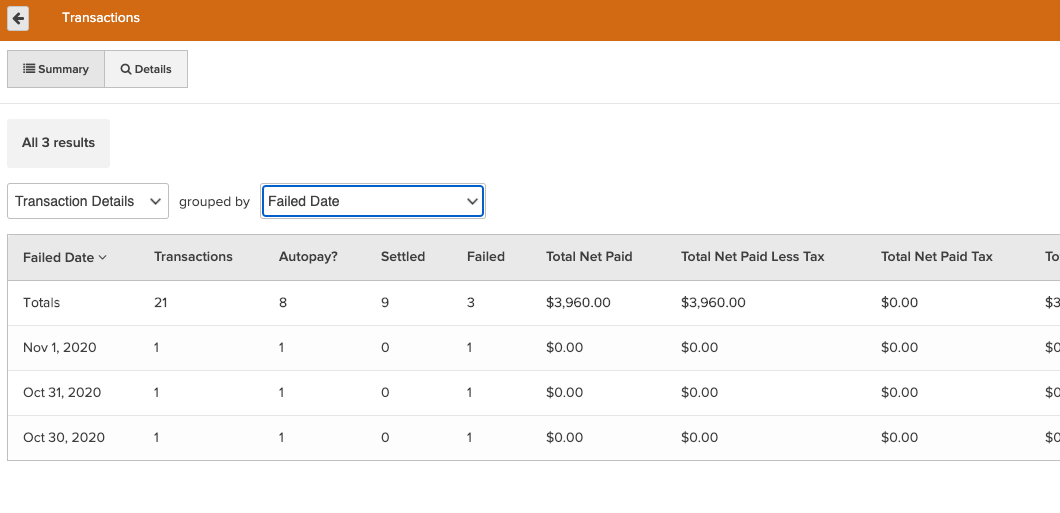
There are also corresponding options to group by Week, Month, Quarter, or Year. Transaction Date and Failed Date can also be filtered in the "Details" view to narrow down the window of time for review.
Details View
In addition to the summary view, there is also a Details view that shows greater information on each transaction. This view can easily be filtered to a desired timeframe, specific transaction statuses (such as failed transactions), payers, and more.
Available fields:
- Invoice Number - Unique ID across all invoices for each business. For a franchise report, this number would not be unique. It is only unique at the business level. This is different from Invoice ID in that Invoice ID is unique across all invoices, not just those for this business.
- Invoice Due Date - Date when the invoice is expected to be paid. This is displayed in the time zone of the business.
- Invoice Status - Current state of the invoice. Possible states include Cart, Open, Closed, Canceled, On Hold, and Purchase Request.
- Transaction Status - Current state of the transaction. Possible states include Completed, Failed, Checkout, Processing, Voided, and Settled.
- Transaction At - Date and time when the transaction was created. This is displayed in the time zone of the business.
- Transaction Date - Date when the transaction was created. This is displayed in the time zone of the business.
- Transaction Type - Type of the transaction. Possible values include Payment and Refund.
- Transaction Amount - Amount of the transaction.
- Payer - Full name of the person who made the transaction.
- Payer Home Location - Current home location of the person who made the transaction. This is the payer's primary location of use.
- Payer's Primary Staff Member - Full name of the payer's current primary staff member.
- Payment Method - Payment method used for the transaction. Possible values include ACH, Cash, Check, Account Credit, Credit Card, External, Free, and Other.
- Credit Card Name - Name of the credit card used for the transaction, if applicable. Possible values include American Express, Discover, Mastercard, Visa, and Other Credit Card.
- Processing Method - Processing method of the transaction. Possible values include Global Pay, American Express, and Other.
- External Payment Name - Name of the external payment type as designated by the business, such as bitcoin or gift card.
- External Transaction ID - ID associated with the payment method used for the transaction, if available. For example, this could be the check number when purchased with a check or the processing ID from a merchant processor when a credit card is used.
- Net Paid - Amount of the successful transaction. For payments, this is the paid amount. For refunds, this is the refunded amount.
- Net Paid Less Tax - Portion of Net Paid that is not allocated to tax.
- Net Paid Tax - Portion of Net Paid that is allocated to tax.
- Payment Amount - Amount of the successful payment.
- Refund Amount - Amount of the successful refund.
- Autopay? - Indicates whether the transaction was created as part of automated billing.
- Sale Location - Name of the business location where the sale occurred.
- Invoice Created By - Full name of client or staff member who created the invoice.
- Void At - Date and time when the transaction was voided. This is displayed in the time zone of the business.
- Failed At - Date and time when the transaction failed. This is displayed in the time zone of the business.
- Error Message - Error message if the transaction failed.
- Transaction ID - Unique ID across all transactions.
- Payer ID - Unique ID for the person paying the invoice.