
The Payroll report offers a comprehensive look at your business's compensation data, allowing you to track payment history, categorize earnings by service, and manage pending payouts in one place.
In this article
Who can use this feature?
- Pike13 Plans: ✅Premium, ✅Advanced, ❌Essential
- User Roles: ✅Primary Owner, ✅Owner, ❌Manager, ❌Staff, ❌Limited Staff
Quick Views
Pay Last Month by Staff Member - A concise summary of individual staff earnings and total payroll totals for the previous month.
Current Pending Pay -A detailed breakdown of all un-finalized pay items
Summary View
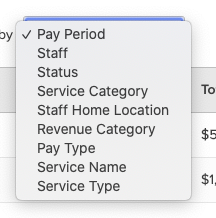
The Payroll report features a 'Pay Details' view that allows you to organize data by specific payroll attributes, automatically calculating the following metrics for each group:
- Count - Total number of unique payroll entries.
- Total Final Pay - Sum of all payroll amounts paid to the staff member.
- Total Base-rate Pay - Portion of the Total Final Pay that comes from the base pay rate assigned to a service.
- Total Tiered-rate Pay - Portion of the Total Final Pay that comes from the tiered pay. Tiered pay is the bonus set for when attendance reaches a specific number.
- Total Per-head-rate Pay - Portion of the Total Final Pay that comes from the per-head pay. Per-head pay is the bonus set for each enrolled client after a minimum attendance is reached.
- Total Hours - Total number of hours for services associated with the pays.
Key Dates
The Key Date filter allows you to generate reports for specific pay periods by selecting the precise date range that aligns with your business's payroll cycle.
Details View
In addition to the summary view, there is also a Details view that shows greater details on payroll. This view can easily be filtered to a desired pay period, specific pay rates, staff members, and more.
Available details in this view are:
- Period Start - Start date of the pay period.
- Period End - End date of the pay period.
- Staff - Name of the staff member who should receive the pay.
- Final Pay - Total amount that should be paid to the staff member.
- Base-rate Pay - Portion of Final Pay that is base pay. Base pay is the pay rate assigned to a service.
- Tiered-rate Pay - Portion of Final Pay that is tiered pay. Teired pay is the bonus set when attendance for a service reaches a specific number.
- Per-head-rate Pay - Portion of Final Pay that is per-head pay. Per-head pay is the bonus set for each client after the minimum service attendance is reached.
- Hours - Hours associated with a service and pay rate. For non-Service pay types, this will be zero.
- Status - Current state of the payroll entry. Possible values are Approved, Denied and Pending.
- Pay Type - Type of the payroll entry. Possible values are Adhoc, Commission, Service and Tip.
- Pay Description - Additional details for the payroll entry. Descriptions may contain the service name or a custom description for Adhoc pays.
- Service - Name of the service associated with the payroll entry.
- Service Type - Type of the service associated with the payroll entry. Possible values are Appointment, Course and Class.
- Service Date - Date when the service happened. Provided in the event's timezone.
- Service Location - Location where the service happened.
- Service Category - Category of the service associated with the payroll entry.
- Recorded At - Date and time when the payroll entry was created. Entries are created when the attendance is confirmed or when an Adhoc pay is created.
- Reviewed By - Name of the person who reviewed the payroll entry.
- Reviewed Date - Date and time when the payroll entry was reviewed. Provided in the event's timezone.
- Home Location - Current home location of the person who should receive the pay.
- Revenue Category - Business defined revenue category assigned to the service assciated with the payroll entry.
- Staff ID - Person ID of the staff member who should receive the pay. This is unique across all people.
- Pay ID - Unique ID across all pays.