
The Invoices report is a great resource for analyzing details of your billings, their status, and revenue.
In this article
Who can use this feature?
- Pike13 Plans: ✅Premium, ✅Advanced, ✅Essential
- User Roles: ✅Primary Owner, ✅Owner, ❌Manager, ❌Staff, ❌Limited Staff
Quick Views
For a fast look at your current billing cycle, use these two pre-configured reports:
New Invoices This Week: A summary of all invoices issued during the current week.
Current Invoices Past Due: A focused list of all invoices that have missed their payment deadline.
Summary View
The Summary View allows you to group data by specific attributes to see high-level trends. You can toggle between two specific perspectives:
The following metrics are computed for each group of invoices:
Invoices Details
- Invoices - The count of unique invoices.
- Total Net Paid - Sum of all successful payments less all successful refunds.
- Total Unpaid - Sum of all outstanding amounts to be collected.
- Total Payment Amount - Sum of all successful payments.
- Total Refund Amount - Sum of all successful refunds.
- Total Expected Amount - Sum of all amounts expected to be collected given discounts, coupons, adjustments and add-ons.
- Coupons - Sum of all coupon amounts applied.
- Discounts - Sum of all discount amounts applied.
- Adjustments - Sum of all non-discount and non-coupon adjustment amounts applied.
- Gross - Sum of all prices of the products at time of sale including inclusive taxes. Exclusive taxes, discounts, coupons, adjustments and add-ons are not included in this amount.
- Autopay - The count of unique invoices created as part of automated billing.
- Created by Client - The count of invoices created by clients.
Tax Related Details
- Invoices - The count of unique invoices.
- Total Net Paid - Sum of all successful payments less all successful refunds.
- Total Net Paid Less Tax - The portion of Total Net Paid that is not allocated to tax
- Total Net Paid Tax - The portion of Total Net Paid that is allocated to tax
- Total Expected Amount - Sum of all amounts expected to be collected given the discounts, coupons, and adjustments.
- Total Expected Less Tax - The portion of Total Expected Amount that is not allocated to tax
- Total Expected Tax - The portion of Total Expected Amount that is allocated to tax
Key dates
You can filter or group both Summary and Detailed reports by three vital dates: Issued Date, Due Date and Closed Date.
Use Issued Date to group invoices by the day that they were created.

Use Due Date to group invoices by the day that they were due.

Use Closed Date to group closed invoices by the day that they were closed.
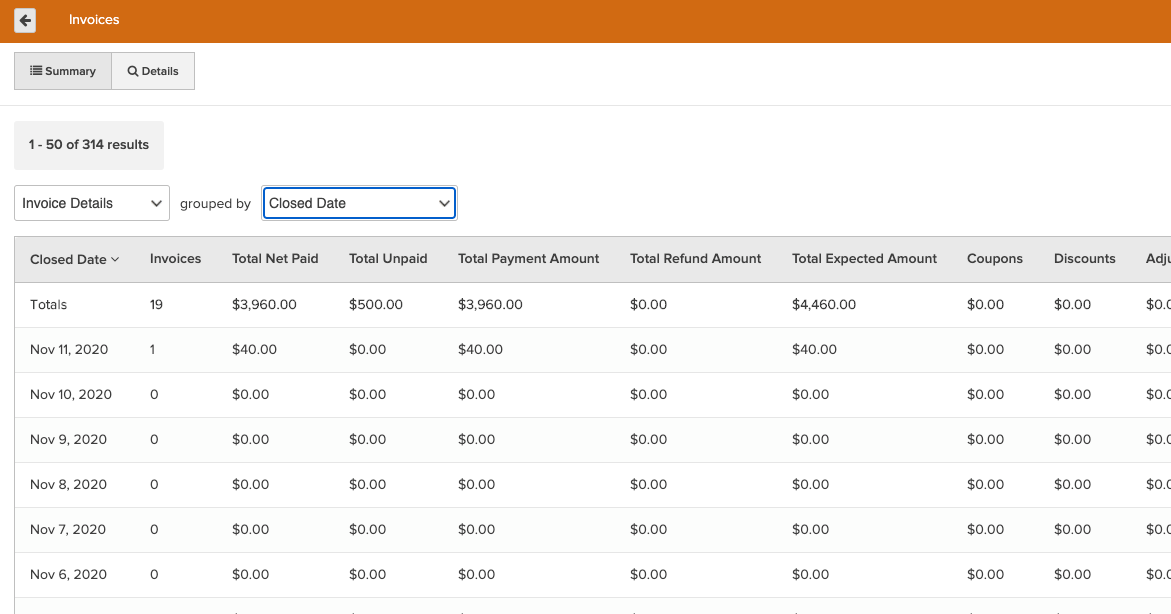
There are also corresponding options to group by Week, Month, Quarter, or Year. Issued Date, Due Date and Closed Date can also be filtered in the Details view to narrow down the window of time for review.
Details View
The Details View provides a granular, line-by-line look at every invoice. This view is highly customizable via filters for timeframe, invoice status (e.g., Open, Closed, Canceled), and specific payers.
Available details in this view are:
- Payer - Full name of the person responsible for payment of the invoice.
- Invoice Number - Unique ID across all invoices for each business. For a franchise report, this number would not be unique, it is only unique at the business level. This is different from invoice_id in that invoice_id is unique across all invoices, not just those for this business.
- Due Date - Date when the invoice is expected to be paid. This is displayed in the timezone of the business.
- Closed Date - Date when the invoice was closed. This is displayed in the timezone of the business.
- Invoice Status - Current state of the invoice. Possible states include Open, Closed, Canceled, On Hold, and Purchase Request.
- Net Paid - Total amount of the successful payments less successful refunds.
- Unpaid - Total outstanding amount to be collected.
- Payment Amount - Amount of successful payments.
- Refund Amount - Amount of successful refunds.
- Expected Amount - Total amount expected to be collected given discounts, coupons, adjustments and add-ons.
- Coupons - Total amount of coupons applied.
- Discounts - Total amount of discounts applied. This does NOT include coupons or adjustments.
- Adjustments - Total amount of non-discount and non-coupon adjustments applied, such as price overrides or prorations.
- Gross - Price of the product at time of sale including inclusive tax. >Exclusive taxes, discounts, coupons, adjustments and add-ons are not included in this amount.
- Net Paid Less Tax - Portion of Net Paid that is not allocated to tax.
- Net Paid Tax - Portion of Net Paid that is allocated to tax.
- Expected Less Tax - Portion of Expected Amount that is not allocated to tax.
- Expected Tax - Portion of Expected Amount that is allocated to tax.
- Unpaid Less Tax - Portion of Unpaid that is not allocated to tax.
- Unpaid Tax - Portion of Unpaid that is allocated to tax.
- Autopay? - Indicates whether the invoice was created by automatic billing.
- Created by Client? - Indicates whether the invoice was created by the client.
- Issued Date - Date when the invoice was issued. This is displayed in the timezone of the business.
- Invoice Created By - Full name of staff or client who created the invoice.
- Commission Recipient - Full name of person receiving commission. Only provided when a commission recipient is specified at the time the invoice is created.
- Sale Location - Name of business location where the sale occurred.
- Failed Transactions - Count of unique failed transactions for this invoice.
- Refunded Transactions - Count of unique settled refund transactions for this invoice.
- Days since Invoice Due - Number of days since Due Date. Will be blank for invoices that are due in the future.
- Purchase Request ID - Unique ID across all purchase request, if applicable.
- Purchase Request State - Current state of the purchase request. Possible states include Open, Declined, Canceled, Expired, Purchased, or Not Application.
- Purchase Request Message - The purchase request message, if applicable (up to first 50 characters).
- Purchase Request Cancel Reason - When the purchase request is canceled or declined, the reason for cancellation or decline (up to first 50 characters).
- Primary Staff Member - Full name of invoice payer's primary staff member at time of sale.
- Payer ID - Unique ID for the person paying the invoice.