
The Clients Report is the central hub for data about the people you serve. It provides a granular look at your customer base, allowing you to track everything from from tenure and unpaid bills to birthdays, email addresses, current passes and plans.
In This Article
Who can use this feature?
- Pike13 Plans: ✅Premium, ✅Advanced, ✅Essential
- User Roles: ✅Primary Owner, ✅Owner, ❌Manager, ❌Staff, ❌Limited Staff
Access to reports is not the default, but owners can provide access to any staff member through the staff member's profile.
Quick Views
Pike13 includes several standard "Quick Views" to help you find common data instantly:
-
New Clients Today - A list of all client profiles created today.
-
Current Members - A list of all clients with an active membership status.
-
Clients With No Signed Waivers - Useful for compliance auditing; shows active clients missing a waiver.
-
Clients Last Visited 30+ Days - A retention list showing clients who have visited more than 30 days ago and have no future visits scheduled.
Summary View
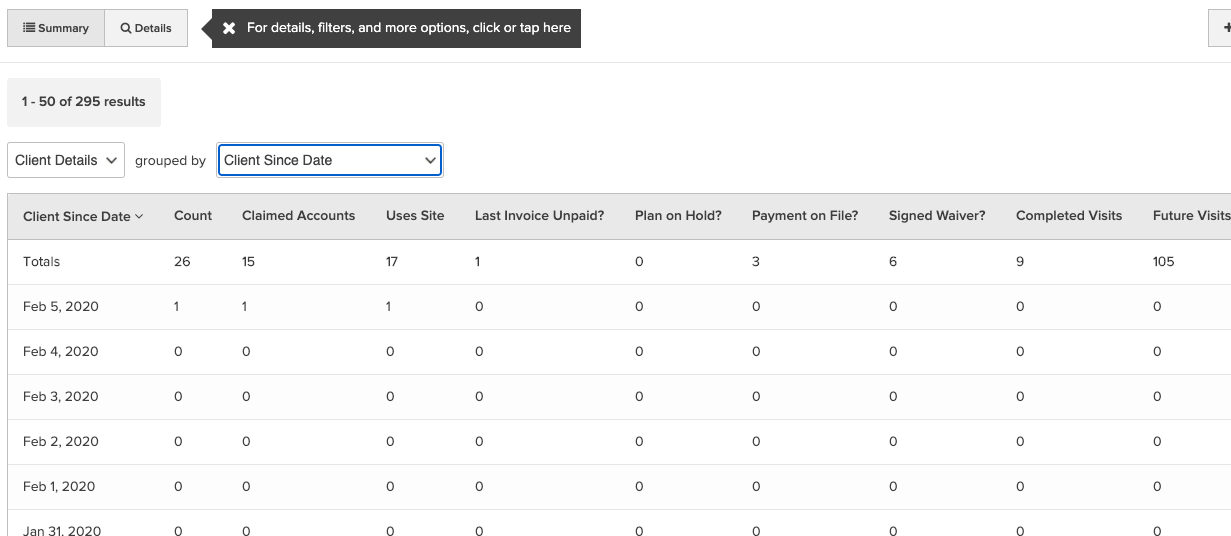
The summary view allows you to group clients by specific attributes (e.g., "Client Since Date") to see high-level trends. When grouping data, the following metrics are calculated:
- Counts - A count of unique clients.
- Claimed Accounts - Count of clients who have claimed their account.
- Uses Site - Count of clients who have accessed your Pike13 site.
- Last Invoice Unpaid? - Count of clients whose last invoice is unpaid.
- Plan on Hold? - Count of clients who have a plan on hold.
- Payment on File? - Count of clients who have a payment method on file.
- Signed Waiver? - Count of clients who have signed at least one waiver.
- Completed Visits - Sum of all visits completed by your clients.
- Future Visits - Sum of all future visits scheduled for your clients.
- Unpaid Visits - Sum of all unpaid visits by your clients.
- Account Credit - Sum of account credit amounts for all your clients.
- Total Net Paid Less Tax - Sum of all successful transactions not allocated to tax for all your clients.
Key Dates
From the grouped by Menu you can see summary of data based on the follow options.
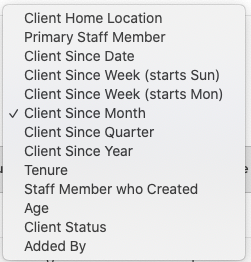
Example: Use Client Since Date to group clients by the day that they were created.
Details View
The Details view provides greater details on each client. You can easily filter and sort by these fields to create custom reports.
Biographical & Contact Info
Here is the rewritten Details View section. I have preserved every specific field name exactly as it appears in your reporting tools while clarifying the definitions for better readability.
-
Client: The full First and Last Name of the client.
-
First Name: The client's first name.
-
Middle Name: The client's middle name.
-
Last Name: The client's last name.
-
Client ID: The unique identification number assigned to the client by the system.
-
Client Status: The current state of the profile. Possible values are Active, Hidden, or Deleted.
-
Email: The client's email address.
-
Phone: The client's phone number.
-
Address: The client's physical mailing address.
-
Client Home Location: The specific location assigned as the client's "Home" gym or studio.
-
Birthdate: The client's date of birth.
-
Age: The client's current age.
-
Days Until Birthday: The count of days remaining until the client's next birthday.
-
Last Email Bounced?: Indicates if the most recent email sent to this client failed to deliver.
Membership & Tenure
-
Client Since: The date the profile was created (or the earliest date if profiles were merged).
-
Tenure: The total number of days since the client joined.
-
Has Membership?: Indicates if the client currently holds a pass or plan that grants membership status.
-
Last Membership End Date: The expiration date of the client's membership access. A future date indicates when access will end; a past date indicates they are no longer a member. If empty, the client has no membership history or is on a recurring plan with no set end date.
-
Next Pass/Plan End Date: The nearest future expiration date for any of the client's passes or plans.
-
Current Passes/Plans: A list of all active passes or plans that have not yet expired.
-
Current Passes/Plans: Type: The specific Plan Types (e.g., "Unlimited," "Punch Card") corresponding to the active items listed above.
-
Current Passes/Plans: Revenue Categories: The revenue categories assigned to the client's active passes or plans.
-
Has Plan on Hold?: Indicates if the client currently has at least one plan in a suspended "On Hold" state.
Attendance & Activity
-
First Completed Visit Date: The date of the very first visit the client completed.
-
Last Completed Visit Date: The date of the most recent visit the client completed.
-
Last Completed Visit Service: The name of the specific service (e.g., "Yoga Level 1") attended during their last visit.
-
Days Since Last Completed Visit: The number of days elapsed since the client last visited.
-
Completed Visits: The total count of past visits the client has attended.
-
Future Visits: The number of upcoming visits the client is enrolled in (excludes waitlisted events and canceled visits).
-
Last Site Access: The date the client last logged into your Pike13 website.
-
Account Claim Date: The date the client "Claimed" their account (created a password and logged in).
Financials
-
Unpaid Visits: The number of completed visits that have not yet been paid for.
-
Last Invoice Due Date: The due date of the client's most recently generated invoice (excludes canceled/hold invoices).
-
Last Invoice Amount: The dollar amount of the most recently generated invoice.
-
Last Invoice Unpaid?: Indicates if the most recent invoice is still open (not paid in full).
-
Payment on File?: Indicates if the client has a valid credit card or bank account saved.
-
Net Paid Less Tax: The lifetime revenue collected from this client (total successful payments minus any tax).
-
Account Credit: The total dollar amount of store credit currently available on the client's account.
Staff, Relationships, & Admin
-
Signed Waiver?: Indicates if the client has signed at least one liability waiver.
-
Last Signed Waiver Name: The specific name of the most recent waiver the client signed.
-
Primary Staff Members: The staff member(s) designated as the primary contact for this client.
-
Staff Member who Created: The name of the staff member who originally created this client profile.
-
Added By: The method used to create the profile (e.g., Client, File Import, Staff, Kiosk, or Unknown).
-
Account Managers: The name(s) of the person who manages this profile (e.g., a parent).
-
Account Manager Emails: The email addresses of the designated account manager(s).
-
Account Manager Phones: The phone numbers of the designated account manager(s).
-
Account Manager Only?: Indicates if this profile exists only to manage others (does not attend services themselves).
-
Dependents: A list of names of other clients managed by this profile.
-
Guardian Name: The name of the designated guardian.
-
Guardian Email: The email address of the designated guardian.
-
Also Staff?: Indicates if this client profile is also linked to a staff member account.
Note
Custom Fields
The Details view of the clients report also includes columns for client-specific custom fields. There will be one column for each available custom field that can be filtered and sorted just like the other columns in the report.
-
Delay: For newly created custom fields, there is roughly a two-hour delay before they appear in the reporting pipeline.