
When you sign in to your Pike13 account, your Dashboard is your central hub for managing your schedule, payments, and personal profile.
In This Article
Tip
If you are on a phone, tap the Three Bars icon in the top left corner to reveal the dashboard menu options.
Dashboard
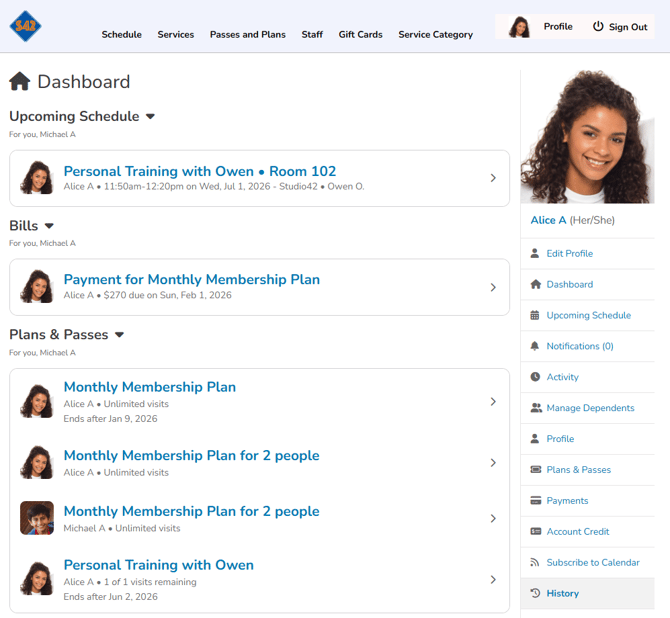
The client dashboard has 4 main sections:
- Important Notices: Lists any items that need urgent attention if applicable
- Upcoming Schedule: Lists scheduled events in which the client or their dependents are enrolled
- Bills: Lists all upcoming bills for recurring plans
- Plans & Passes: Lists all active plans and passes for the client and their dependents
Important Notices
Any urgent actions required—such as signing a waiver, updating an expired credit card, or addressing an overdue payment—will appear at the very top. Tap any alert to resolve the issue immediately.
Upcoming Schedule
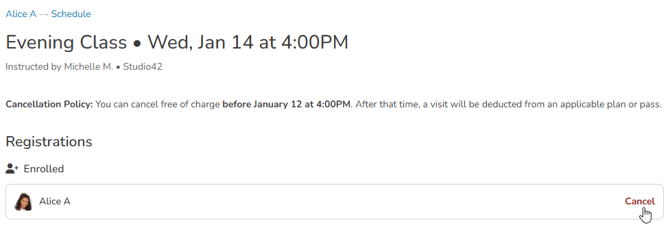
See a list of all scheduled classes, appointments and course sessions. If you cannot make an upcoming class or appointment, click on the scheduled time under Upcoming Schedule, then click Cancel.
Bills
Stay on top of your finances by viewing a list of all upcoming scheduled payments. This helps you know exactly when your next bill or fee is due.
Plans & Passes
This section displays active plans and passes for you and your dependents.
-
Quick View: Click any plan or pass to see remaining visits or expiration dates.
-
Full History: To view inactive, canceled, or upcoming plans, select Manage Plans & Passes from the side menu.